After call metho GET_TEXTSTREAM, call the method flush
Example.
IF o_editor_test IS BOUND.
o_editor_test->get_textstream( IMPORTING text = DATA(lv_text) ).
cl_gui_cfw=>flush( ).
ENDIF.
After call metho GET_TEXTSTREAM, call the method flush
Example.
IF o_editor_test IS BOUND.
o_editor_test->get_textstream( IMPORTING text = DATA(lv_text) ).
cl_gui_cfw=>flush( ).
ENDIF.
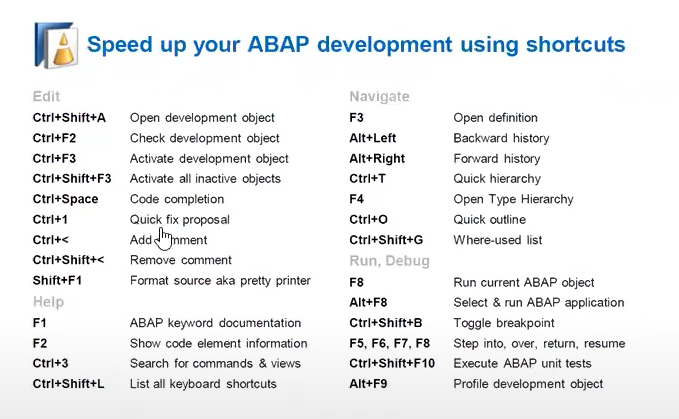
F3 - Igual F2 no SAPGUI - entra no método ou perform
F2 - Exibe campos de estrutura/função/tabelas etc.
CTRL+F3 = Ativar
CTRL+SHIFT+F3 = Ativar vários objetos
F8 = F8 no SAPGUI - executa programa
CTRL+SHIFT+< = Comentar código
CTRL+SHIFT+> = Descomentar código
CTRL+SHIFT+X = upper case
CTRL+SHIFT+Y = lower case
CTRL+1 = opções para implementar, renomear, excluir método
ALT+SHIFT+R = Renomeia uma variável de qualquer tipo em todos os lugares onde a variável é utilizado no mesmo objeto (as vezes dá pau mas funciona)
CTRL + O - Lista de métodos ou subrotinas para navegação
CTRL+SHIFT+G - Lista de utilização do objeto
Navegar para elemento de texto.

Alt+F2 - Shows the signature of the method you are currently editing
Tab/Shift+Tab - When selecting a multiple lines of code, Tab indents the selection and Shift+Tab decreases the indent
CTRL+SHIFT+L - This open a list with all shortcuts available.
https://blogs.sap.com/2022/12/06/abap-cheat-sheets/
from blog
https://blogs.sap.com/2013/11/21/useful-keyboard-shortcuts-for-abap-in-eclipse/
Editing source code:
Navigation:
Editor Tabs:
Debugging:
- Para exibição de HTML no container da SBWP por mais que o HTML funcione 100% no ambiente tipo chrome, edge ou qualquer outra ferramenta para exibição no SAP especificamente na exibição de conteúdo as vezes aparece algumas tags fora de posição ou aparece a tag mesmo, etc..
Para resolver esse problema fiquei procurando até achar um cara que fala de uma nota da SAP q desconhecia até então falando justamente da do HTML em editor sapscript.
2472157 - Work item description with HTML table in expression is not displayed correctly
Resumindo a nota a estrutura que deve ser usado para montar o HTML deve ser a RSWEBPUB_T_W3HTML que é a mesma estrutura do editor sapscript
Na primeira linha do sapscript no container do workflow deve ser colocado o texto MAIL_HTML_ONLY e depois a tabela que tem o HTML.
Ficaria dessa forma.
==== Eu alterei o TLINE_T pela RSWEBPUB_T_W3HTML que é mais apropriado


AT FIRST.
APPEND '<html>' TO rt_html.
APPEND '<style>' TO rt_html.
APPEND 'table, th, td{ text-align: left; font-family: "Helvetica"; }' TO rt_html.
APPEND '</style>' TO rt_html.
APPEND '<body>' TO rt_html.
APPEND '<h2>Liberação de Pagamento para Fornecedor</h2> <p>' TO rt_html.
APPEND |<table>| TO rt_html.
APPEND |<tr>| TO rt_html.
APPEND |<th style="width:200px; text-align:left;">Fornecedor:</th>| TO rt_html.
APPEND |<td style="width:500px; text-align:left;">{ lr_doc->supplier }-{ lr_doc->supplierfullname }</td>| TO rt_html.
APPEND |</tr>| TO rt_html.
APPEND |<tr>| TO rt_html.
APPEND |<th style="width:200px; text-align:left;">Data do Lançamento :</th>| TO rt_html.
APPEND |<td style="width:500px; text-align:left;">{ lr_doc->postingdate DATE = ENVIRONMENT }</td>| TO rt_html.
APPEND |</tr>| TO rt_html.
APPEND |<tr>| TO rt_html.
APPEND |<th style=<th style="width:200px; text-align:left;">Data do Vencimento :</th>| TO rt_html.
APPEND |<td style="width:500px; text-align:left;">{ lr_doc->netduedate DATE = ENVIRONMENT }</td>| TO rt_html.
APPEND |</tr>| TO rt_html.
APPEND |<tr>| TO rt_html.
APPEND |<th style="width:200px; text-align:left;">Texto Cabeçalho :</th>| TO rt_html.
APPEND |<td style="width:500px; text-align:left;">{ lr_doc->documentitemtext }</td>| TO rt_html.
APPEND |</tr>| TO rt_html.
APPEND |<tr>| TO rt_html.
APPEND |<th style="width:200px; text-align:left;">Documento criado por :</th>| TO rt_html.
APPEND |<td style="width:500px; text-align:left;">{ lr_doc->accountingdoccreatedbyuser }-{ lv_username }</td>| TO rt_html.
APPEND |</tr>| TO rt_html.
APPEND |<tr>| TO rt_html.
APPEND |</table>| TO rt_html.
APPEND '</p><p/>' TO rt_html.
APPEND '<table>' TO rt_html.
APPEND |<th style="width:80px; text-align:left; border:1px solid ;">Item</th>| TO rt_html.
APPEND |<th style="width:200px; text-align:center; border:1px solid black;">Valor do item</th>| TO rt_html.
APPEND |<th style="width:70px; text-align:left; border:1px solid black;">Moeda</th>| TO rt_html.
APPEND |<th style="width:150px; text-align:left; border:1px solid black;">Centro de Lucro</th>| TO rt_html.
APPEND |<th style="width:500px; text-align:left; border:1px solid black;">Atribuição</th>| TO rt_html.
APPEND '</tr>' TO rt_html.
ENDAT.
APPEND '<tr>' TO rt_html.
APPEND |<th style="width:80px; text-align:left; border:1px solid ;">{ lr_doc->accountingdocumentitem }</td>| TO rt_html.
APPEND |<th style="width:200px; text-align:right; border:1px solid black;">{ abs( lr_doc->amountincompanycodecurrency ) NUMBER = ENVIRONMENT }</td>| TO rt_html.
APPEND |<th style="width:70px; text-align:left; border:1px solid black;">{ lr_doc->companycodecurrency }</td>| TO rt_html.
APPEND |<th style="width:150px; text-align:left; border:1px solid black;">{ lr_doc->profitcenter }</td>| TO rt_html.
APPEND |<th style="width:500px; text-align:left; border:1px solid black;">{ lr_doc->assignmentreference }</td>| TO rt_html.
APPEND '</tr>' TO rt_html.
ENDLOOP.
APPEND '</table>' TO rt_html.
APPEND '</body>' TO rt_html.
APPEND '</html>' TO rt_html.
SWU3 - Configuração de jobs automáticos
SWIA - Para eliminar processos de workflow parados na caixa de entrada

Ao testar a conexão dava um erro que não acha o grupo SPACE, nessa transação SMLG o grupo para o servidor estava em branco, eu preenchi com o SPACE e deu certo

Workflow Development
ABAP Development
